Rate Schedules
A Rate Schedule is an agreed upon list of what services, materials, or prices are expected to be for a specific period. Rate schedules are submitted by Buyers to their Suppliers, who use them to populate their Invoices. Rate Schedule values are predetermined and agreed upon by the Buyer and Supplier, and are not negotiated or approved through Enverus. Rate schedules are specific to each Buyer-Supplier relationship.
|
note |
Depending on your relationships, you may or may not use Rate Schedules. |
To view a Rate Schedule:
- In Workbench, open the Rate Schedules folder.
A list of documents is displayed. - Double-click the Rate Schedule you want to view.
The Rate Schedule form displays.
Rate Schedule Elements
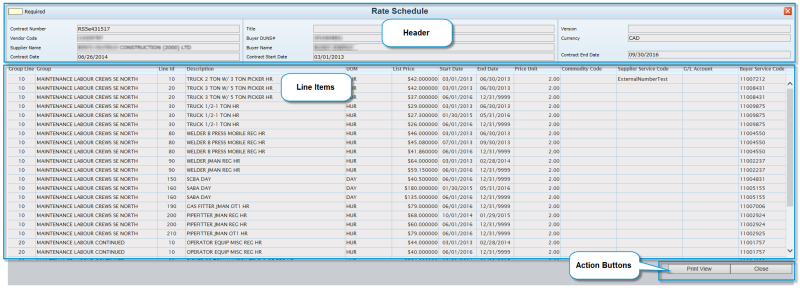
The following image shows a Rate Schedule and its main elements:
|
note |
You are able to configure the view of your Rate Schedule by clicking on the plus and minus buttons within the form to hide or view those areas. The view settings only apply to the current Rate Schedule you are working in and will be lost when the Rate Schedule form is closed. |
Header Fields
The header of the Rate Schedule form contains general details that pertain to the entire Rate Schedule. The header area consists of the following fields:
- Contact Number: the document number assigned to the Rate Schedule by
- Vendor Code: the code that
- Supplier Name: the Supplier's company name.
- Contract Date: the date that Rate Schedule was contracted between
- Title: the name or title of the Rate Schedule.
- Buyer DUNS#:
- Buyer Name:
- Contract Start Date: the date that the Rate Schedule becomes valid.
- Version: the version number of the Rate Schedule.
- Currency: the currency used for the Rate Schedule list prices.
- Contract End Date: the date that the Rate Schedule is no longer valid.
Line Items
On the Rate Schedule form, fields are displayed in collapsible areas, organized by Line Item number and item description.
For example, in the image below all items with a Line Item number of '40' and a Description name of 'Dracula' are displayed in one collapsible area. Each Item Description in the 'Dracula' group can be expanded to display its specific rate details.
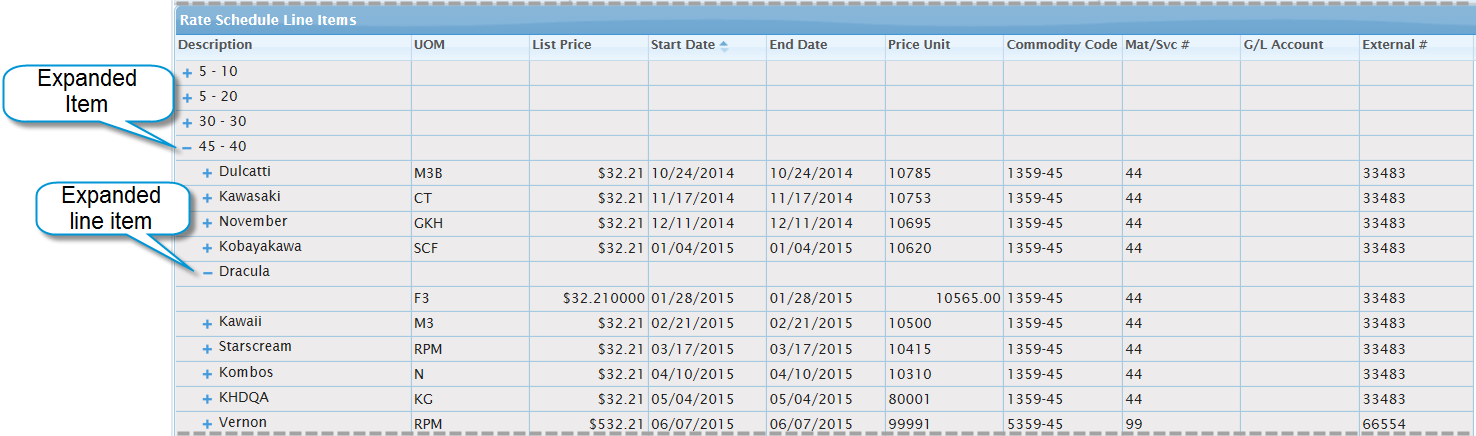
The line items area of the Rate Schedule form consists of the following fields:
- Line Item: the line item number.
- Item Description: description of the line item goods or services.
- UOM: Unit of Measure code associated with the item being quantified.
- List Price: the price with which the rate is calculated.
- Start Date: the start date for the validity of this pricing condition.
- This must be greater than, or equal to the Contract Start Date
- This must be equal to, or less than the Contract End Date and Line Item End Date
- End Date: enter the end date for the validity of this pricing condition.
- This must be equal to, or in between the Contract Start Date and/or the Contract End Date
- If the Line Item Start Date is equal to the Contract End Date, then the Line Item End Date should also be the same as the Contract End Date
- Price Unit: the number of units per List Price. Automatically defaults to 1 if no data is present.
- If a pallet of 10, 000 boxes of bolts (the Price Unit) have a cost of $1000.00 per box (the List Price) totaling $10, 000.00, then selling half a pallet would require that a Price Unit of 5000 is entered. This would automatically charge the Trading Partner $5000.00.
- Mat/Svc #: the Supplier’s
- Commodity Code: the commodity code assigned to the item, if applicable.
- External #: an external reference number used by
- G/L Account: the GL account code for the item, if applicable.
- AFE: the AFE number for the item, if applicable.
- Cost Center: the Cost Center for the item, if applicable.
- Network: the Network code for the item, if applicable.
If this was populated, Network Activity will also be populated. - Network Activity: the Network Activity code for the item, if applicable.
If Network was populated, this will also be populated. - Work Order: the Work Order number for the item, if applicable.
- Location: the Location for the item, if applicable.